
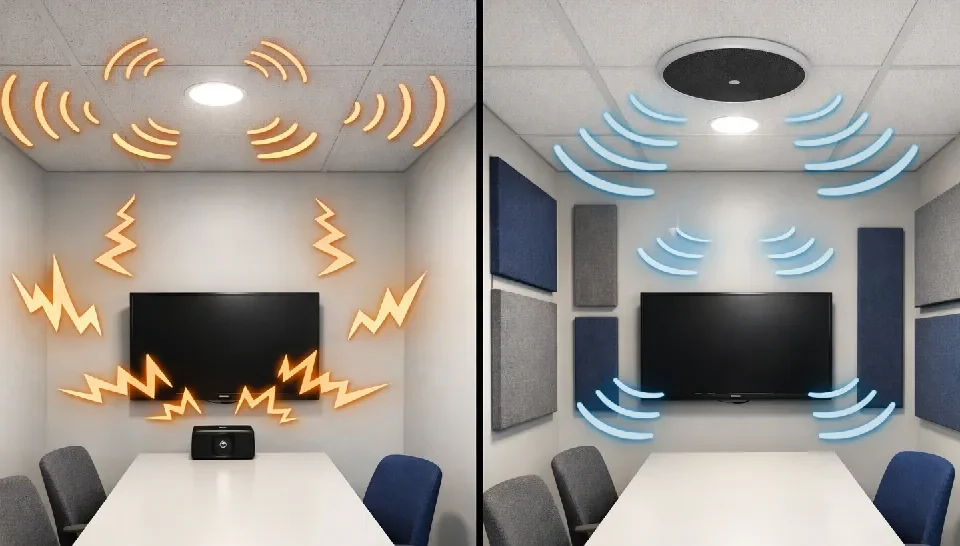

Huddle rooms are designed for quick discussions, hybrid meetings, and team collaboration. Despite their small size, these spaces often face big Audio Visual (AV) challenges. Poor sound, unclear video, and complicated systems can turn short meetings into frustrating experiences. Understanding these challenges early helps create huddle rooms that truly support productivity.
Table Of Content
1. Poor Audio Quality
Audio issues are the most common problem in huddle rooms. Small spaces with hard surfaces often cause echo, uneven sound, or muffled voices. Built in laptop microphones or low quality speakers struggle to capture clear audio, especially during video calls.
How to overcome it:
Use dedicated microphones designed for small rooms, such as ceiling or tabletop microphones with noise reduction. Add acoustic treatments like fabric panels or soft furnishings to reduce echo. Proper speaker placement ensures everyone can hear clearly without increasing volume.
2. Inadequate Camera Placement and Video Quality
Huddle rooms often suffer from awkward camera angles, limited field of view, or poor lighting. This results in remote participants seeing partial faces, dark images, or distorted visuals, making collaboration uncomfortable.
How to overcome it:
Choose wide angle cameras suitable for small rooms and position them at eye level. Maintain balanced lighting throughout the room to minimize shadows. Planning camera placement during room design prevents visual compromises later.
3. Complex and Unfriendly Technology
Many huddle rooms fail because the technology is too complicated. Multiple remotes, confusing interfaces, or unreliable connections waste valuable meeting time. If systems are hard to use, teams avoid them altogether.
How to overcome it:
Simplify AV systems with intuitive controls, such as touch panels or one click meeting solutions. Standardize equipment across rooms so users don’t need to relearn systems each time. Clear labelling and basic user training also make a big difference.

4. Cable Clutter and Limited Connectivity
Huddle rooms often become messy with exposed cables, adapters, and power extensions. Limited connectivity options can slow down meetings when users struggle to connect laptops or devices.
How to overcome it:
Plan cable management from the beginning. Use built in table connections, wireless screen sharing, and concealed wiring. Providing standard ports and wireless options keeps the space clean, professional, and easy to use.
5. Acoustic Interference and Noise Leakage
Due to their compact nature, huddle rooms are more vulnerable to external noise and sound leakage. Conversations from nearby spaces or HVAC noise can disrupt meetings and reduce privacy.
How to overcome it:
Use sound absorbing materials in walls, ceilings, and doors. Consider soundproofing measures and noise isolating room placement. Directional microphones can also help focus on voices inside the room.
6. Limited Space for AV Equipment
Huddle rooms have limited space, making it challenging to accommodate AV equipment without cluttering the room. Bulky devices can affect aesthetics and comfort.
How to overcome it:
Select compact, integrated AV solutions designed specifically for small rooms. Wall mounted displays, ceiling speakers, and all in one conferencing systems help maintain a clean and functional layout.
7. Lack of Scalability and Future Readiness
Many huddle rooms are designed only for immediate needs, making upgrades difficult when technology or team requirements change.
How to overcome it:
Plan for scalability by using flexible infrastructure and modular AV systems. Allow room for future upgrades, additional devices, or software changes without major redesigns.

Conclusion
Huddle rooms may be small, but their impact on collaboration is significant. Most AV challenges arise from poor planning or treating technology as an afterthought. By addressing audio quality, video clarity, usability, and integration early, organizations can transform huddle rooms into efficient, frustration free collaboration spaces.
A well designed AV setup ensures meetings start on time, communication remains clear, and teams stay focused on exactly what huddle rooms are meant to deliver.